VoIP Gateway Deployment Checklist: 15 Compliance and Security Checks
Table of Contents
- Introduction
- I. Hardware and Physical Environment (3 Items)
- II. Network Access (3 Items)
- III. SIM Cards and Carrier Compliance (5 Items)
- IV. Security Hardening (4 Items)
- Supplementary Notes on Checklist Execution
- References
- Commercial Content / Non-Legal and Non-Pricing Commitment Statement
Introduction
A poorly configured VoIP gateway can, at best, get its lines suspended by the carrier and, at worst, become an entry point for toll fraud or data leakage. The following checklist is based on deployment experience with the VOIP Gateway 32-512 series and industry security baselines, divided into four dimensions: hardware, network, SIM compliance, and security hardening, with 15 checkpoints in total. It is recommended to confirm each item before the device goes live and retain check records as an operational audit basis. These checkpoints reference common recommendations in telecom equipment security guidelines regarding access control, encryption, and password policies—for example, the layered defense, least privilege, and encryption protection principles emphasized by Ribbon Communications in its SBC security best practices documentation.
I. Hardware and Physical Environment (3 Items)
- Power stability confirmation: The VOIP Gateway 32-512 has a rated power of 12V 7.5A and consumes considerable power when 32 ports run at full load. Confirm use of the original power adapter and avoid powering through USB hubs or unregulated interfaces, as voltage fluctuations may cause silent channel dropouts.
- Heat dissipation space reservation: The device operates at 0-50°C. For rack deployment, ensure front and rear ventilation clearance of no less than 5 cm, and avoid tight stacking when multiple devices are installed.
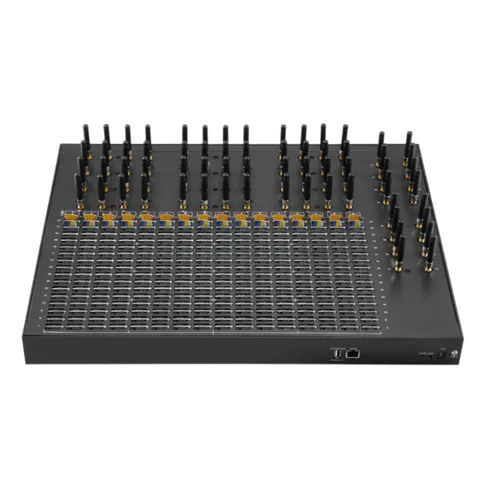
- Antenna connection check: Confirm each of the 32 antennas is tightened one by one. Signal strength should display as a stable value in the Web management interface; adjust position or replace antennas for weak-signal ports promptly.
II. Network Access (3 Items)
- VLAN isolation configuration: Place the gateway in a dedicated voice VLAN, isolated from the office network and guest network. As an edge device, the gateway should not be in the same broadcast domain as employee workstations.
- IP whitelist setting: In the gateway’s SIP access control, allow only the PBX’s IP address to access port 5060. Do not expose the SIP port to the public internet; for remote management, access through a VPN tunnel. Ribbon’s security guide lists access control and topology hiding as core mechanisms for protecting SBCs from external attacks.
- NAT and RTP port confirmation: If the gateway is behind NAT, confirm that the PBX side has RTP symmetric support and external address configured, and that the firewall allows the UDP 10000-20000 media port range.
III. SIM Cards and Carrier Compliance (5 Items)
- SIM card real-name ownership confirmation: All inserted SIM cards should be registered under the enterprise’s name, with usage consistent with call center business. Avoid using cards of unknown origin; some regions have explicit reporting requirements for GOIP-type devices.
- Carrier usage reporting: Confirm with the carrier to which the SIM card belongs that the number can be used for enterprise outbound calling or SMS services. Some plans explicitly prohibit “use in automated outbound calling systems,” and violations may lead to bulk suspension.
- IMEI matching strategy setting: Enable the device’s IMEI modification function and configure a reasonable IMEI for each SIM card. If the carrier detects that the SIM card is inserted into a “non-phone device,” risk control may be triggered.
- Single-card call frequency limit: Set a maximum number of calls per hour or per day for each card in the rotation rules; an initial value of no more than 30 calls/hour is recommended, adjusted gradually based on actual feedback.
- Balance and validity monitoring: Enable USSD balance inquiry and automatic alerts to notify administrators when a SIM card balance falls below a threshold, avoiding channel interruptions due to insufficient funds.
IV. Security Hardening (4 Items)
- Mandatory default password change: Immediately change the admin account password after first logging into the Web management interface. Factory default credentials are publicly documented; not changing the password is equivalent to opening management access. Ribbon’s security best practices explicitly list the “least privilege model” and “minimized system” as foundational principles of device security.
- SMS remote reset backdoor disabled: Some firmware supports remote device reset via SMS commands. Unless there is a genuine operational need, disable this function in the configuration to prevent attackers from taking over the gateway via forged SMS.
- Management port access restriction: Allow only internal management IPs to access the HTTP/HTTPS management interface, and close the WAN-side management entry.
- Log retention and audit: Enable call log and login log recording with a retention period of no less than 30 days. Logs are the foundational basis for troubleshooting and compliance audits. Ribbon likewise emphasizes “detection and response” capabilities—discovering potential attacks and anomalies through audits and event logs.
Supplementary Notes on Checklist Execution
Must all 15 checklist items be completed before going live? Mandatory items in the hardware, network, and security hardening sections (such as changing default passwords and IP whitelisting) should be completed before going live. Carrier reporting in the SIM compliance section has a longer cycle and can proceed in parallel after the device goes live, but unreported cards should not be put into formal outbound calling.
If a SIM card is registered under an individual’s name but actually used by the enterprise, is that compliant? There is risk. In carrier risk control rules, a mismatch between the registered entity and the actual usage scenario is one of the common triggers for card suspension. It is recommended to register under the enterprise’s name, or at least ensure the registrant is informed and consents to the use.
Is VLAN isolation mandatory? Can small-scale deployments skip it? It is not mandatory, but skipping it increases the lateral attack surface. If the gateway and PBX are under the same switch and there is no guest network, the risk is relatively controllable; if the office network and voice network are mixed, at least port isolation is recommended.
Is 30 days of log retention enough? It depends on business and regulatory requirements. 30 days is usually sufficient for troubleshooting; if there are billing reconciliation or compliance audit needs, 90 days or longer may be required. The longer the retention period, the higher the storage and retrieval costs.
What antenna signal strength displayed in the interface is considered normal? There is no unified standard value; it depends on local base station coverage. When signal strength differences between ports on the same device are significant (for example, a difference of more than 10 dBm), check the antenna connection and position of the weak-signal ports.
References
- Ribbon Communications SBC Core Security Best Practices
- FCC Robocall Mitigation Database instructions
Commercial Content / Non-Legal and Non-Pricing Commitment Statement
This is an operational reference checklist, not a legal opinion, nor a carrier compliance certification. The recommendations are compiled based on public industry security documentation and deployment experience, but telecom regulatory rules in each jurisdiction, carrier risk control policies, and the nature of the enterprise’s own business may all change the specific requirements of “compliance.” Readers should consult legal or compliance professionals and bear independent judgment responsibility for deployment decisions. This checklist does not guarantee that completing all items will obtain approval from any carrier or regulatory authority.
Blog
Learn more
Enterprise VoIP Gateway Security Hardening: Toll Fraud Prevention Strategies Through the VOIP Gateway
A VoIP gateway for regulated industry needs defense in depth: IP ACLs, strong SIP auth, voice VLAN isolation, and ASR/ACD anomaly alerts to stop toll fraud.
How SMS Gateways Multi-SIM Management Cuts Carrier Throttling Risk
A practical guide to SMS gateways multi-SIM management: rotation rules, round-robin balancing, failover, and remote SIM pools—without triggering carrier caps.
How the VOIP Gateway 32-512 Update Improves ROI with a 512 SIM Pool
The VOIP Gateway 32-512 update adds a 512 SIM pool, custom rotation triggers, and carrier-weighted scheduling—cutting call center line costs by about 30%.